I Built a YouTube Title Generator With ChatGPT Codex
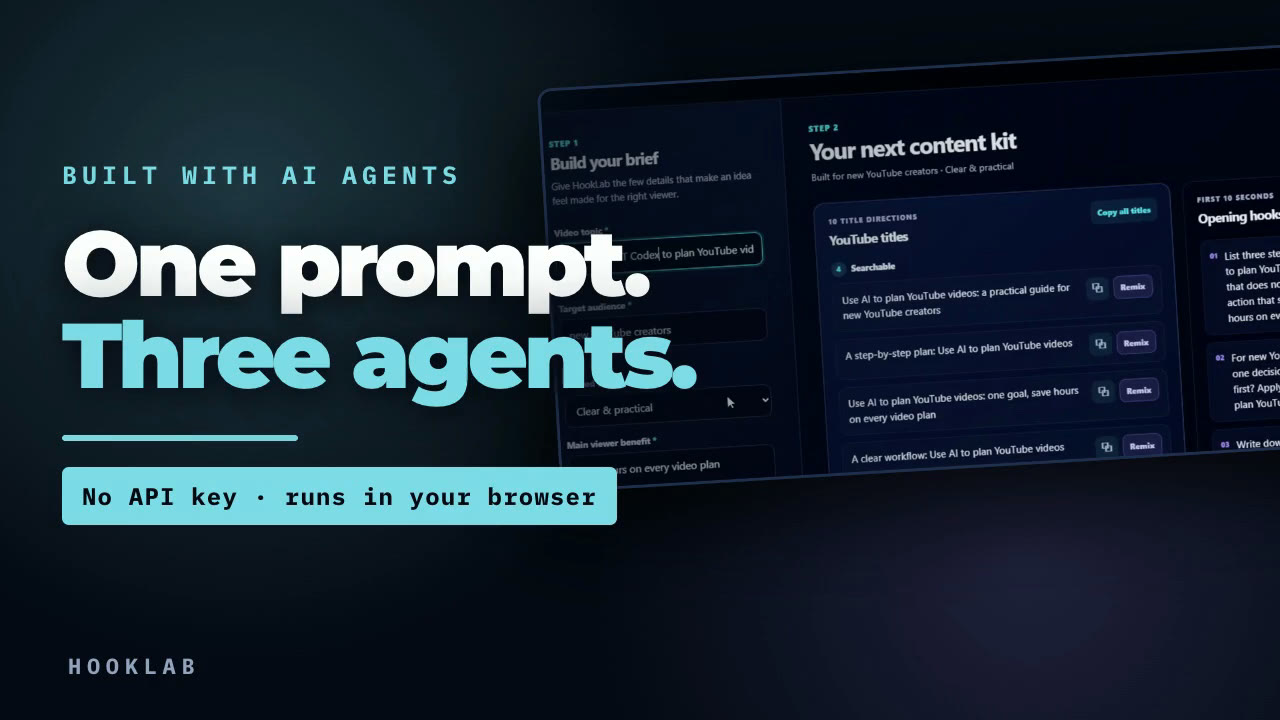
🎬 Watch the video: I Built a YouTube Title Generator With ChatGPT Codex · 📓 Download the guide as a PDF — the full prompt is below, copy-paste ready.
Most "I built an app with AI" videos hand you a time-lapse of a chat window and call that the process. The time-lapse is not the explanation. The explanation is what got decided — and almost none of those decisions are visible in a sped-up screen recording.
So here is the whole thing, decisions included.
The tool is HookLab. You give it four things about a video — topic, audience, tone, and the benefit a viewer should get — and it returns ten titles across three strategies, three opening hooks, and five short thumbnail phrases. It runs as plain HTML, CSS and JavaScript in your browser. No account, no API key, no hidden usage bill.
That last part matters more than it sounds. Codex helped build the tool. The tool itself is deterministic — when you press the button, no model is called. What you get is a repeatable starting point you can read, inspect, and change, not a black box you have to trust.
One prompt, but not one agent
The build came from a single prompt. That prompt does two jobs at once: it specifies the app, and it sets up who does what.
The second half is the part people skip. Instead of asking one agent to do everything, the prompt splits the work into three roles and forbids them from overlapping:
- Sol orchestrates. Plans the work, delegates, integrates the results, verifies the finished app — and is explicitly told not to do all the implementation itself.
- Luna reviews, read-only. Recommends and audits, returns findings, and never edits a file.
- Terra implements, scoped. One defined task with explicit boundaries. It may create and edit files, but only inside the approved scope.
Two rules do most of the real work here.
The first: never let two agents edit the same files at once. Most compounding breakage in agent builds is two writers touching one file, each undoing the other's assumptions.
The second: the reviewer cannot write. A read-only review is what makes the report trustworthy. It has no way to "fix" something into a new problem, so what it reports is what it found.
That is the whole trick. Not a smarter model — clearer lanes.
Small scope first, then one change at a time
The app was not built in one pass. Each stage was a bounded request with a verifiable result, which is why a later change never broke an earlier one.
| Stage | The ask | What it added |
|---|---|---|
| 1 · Scope | The prompt, nothing more | A working one-page tool: four inputs, ten titles, three hooks, five thumbnail phrases, copy and regenerate |
| 2 · Design | Review hierarchy, spacing, contrast, mobile use — then change only the presentation layer | The dark interface, and results that read as the main thing on the page |
| 3 · Remix | Give every title three variations: safer, bolder, search-friendly | Per-title Remix, handling repeated clicks cleanly and preserving everything already working |
| 4 · Verify | A release audit that adds no feature | Confirmation the form works, results appear with no API key, copy behaves, mobile and keyboard pass, console is clean |
| 5 · Content | Audit the writing, not the code | Removal of repeated structures, vague claims, odd capitalisation, weak hooks, and thumbnail phrases that just repeat the title |
| 6 · Refine | Apply current title research as a refinement layer | Clearer search intent, concrete benefits, honest curiosity, distinct story angles, no fabricated evidence |
Notice stage 2. The instruction was to change only the presentation layer — not "make it look better." That constraint is what stopped a design pass from quietly breaking the generator.
If you have ever fixed one button and somehow ruined three other things, you already understand why scoped work matters.
A smaller, useful scope beats a giant prompt asking for everything at once. Give the system a job it can actually finish, verify that job, and only then add the next one.
Stage 4 is the one people skip
Stage 4 added no features on purpose. It exists to answer one question: does this work when somebody uses it differently than you did?
The checks that actually ran:
- The form works, and results appear without an API key
- Copy and Remix behave correctly, including on repeated clicks
- Layout survives on mobile; keyboard focus is visible and usable
- The browser console is clean — no errors
- Titles, hooks and thumbnail phrases are genuinely distinct from each other
- Nothing fabricates evidence the tool cannot have
A tool can look finished and still fail the first time somebody touches it in an order you did not anticipate. Testing is not the part after the work. It is part of the work.
What it will not do
These matter more than a demo, because knowing them is what keeps the tool useful instead of misleading.
It does not fact-check your video. A vague or misleading brief gives you a vague or misleading starting point. There are no accounts, storage, analytics or performance tracking — nothing is saved and nothing is measured. Templates are starting points, not strategy; they do not decide what your video should be. And there is no real-world proof inside the app — nothing in it knows which phrase will outperform another.
That last one is why I would not paste a title without reading it first. Does it accurately match the video? Can you deliver the promise in the first minute? Is it clear enough for the person you want to reach?
Titles come out in three directions because one angle is not enough. Searchable makes the topic obvious. Curiosity-driven creates a real question without inventing a result. Story-driven gives you a process angle. You are not meant to copy all ten — compare the directions, pick the one that matches the video you actually made, then check the opening hook against your real first thirty seconds.
The prompt
Verbatim from the build recording, not tidied up afterwards. Paste it into an agent that can create files in a folder and delegate to sub-agents.
You are Sol, the lead orchestrator for this HookLab project.
Your job is to plan the work, delegate bounded tasks, integrate the results, and verify the finished app. Do not do all of the implementation yourself.
First inspect the project folder. If it is empty, build the first version with plain HTML, CSS, and JavaScript so it can run locally without installing dependencies or entering an API key.
Use this delegation sequence:
1. Delegate a read-only UX planning task to a gpt-5.6-luna agent. Ask it to recommend a simple beginner-friendly layout, user flow, labels, and result structure. It must return recommendations without editing files.
2. Review those recommendations yourself and define the final scope.
3. Delegate implementation to one gpt-5.6-terra agent. It may create and edit the project files, but it must stay within the approved scope below.
4. After implementation is complete, delegate a read-only QA review to a new gpt-5.6-luna agent. Ask it to test the main flow, responsive layout, keyboard usability, copy buttons, and browser console.
5. You must review the implementation and QA report, fix confirmed issues, run the app yourself, and verify the final result.
Never let two agents edit the same files at the same time. Keep all agents inside this project folder and preserve any existing user work.
Build a polished single-page web app called HookLab.
HookLab helps YouTube creators turn basic video ideas into stronger titles and opening hooks.
Include inputs for:
- Video topic
- Target audience
- Desired tone
- Main viewer benefit
Generate:
- 10 YouTube titles
- 3 opening hooks
- 5 short thumbnail phrases
Separate titles into searchable, curiosity-driven, and story-driven categories. Include copy buttons and a regenerate button.
Use a modern dark interface with bright accent colors. Make it responsive, easy to read, and visually polished.
Include useful sample or deterministic results so the complete interface works without an external API.
Do not add authentication, a database, payments, analytics, deployment, or unrelated features.
Before finishing, report:
- Which agents were delegated and which models they used
- What each agent contributed
- Files changed
- Commands and tests run
- Confirmed fixes
- Known limitations
Prefer to keep it? Download the guide as a PDF — same prompt, plus the delegation sequence, the stage table and the verification checklist in six pages.
Your turn
Nothing in that prompt is Codex-specific. It works in any agent that can create files in a folder and delegate to sub-agents. The model names in it are just the agents that session had available — swap them for yours. What matters is the shape: one agent plans, a different one implements, a third reviews without write access.
Use it on one real video idea this week. Build the local version, generate a kit, Remix the strongest direction — then decide which title you would actually publish, and why.
That last step is the one that stays yours. AI can speed up the draft. It cannot care about the work for you.