GPT-6 Sol vs Luna: 5 Creator Tests, Prompts and Fixes
Watch the companion video: GPT-6 Sol vs Luna: Which One Should You Use?. This guide gives you the prompts, practice inputs and review steps to follow along.
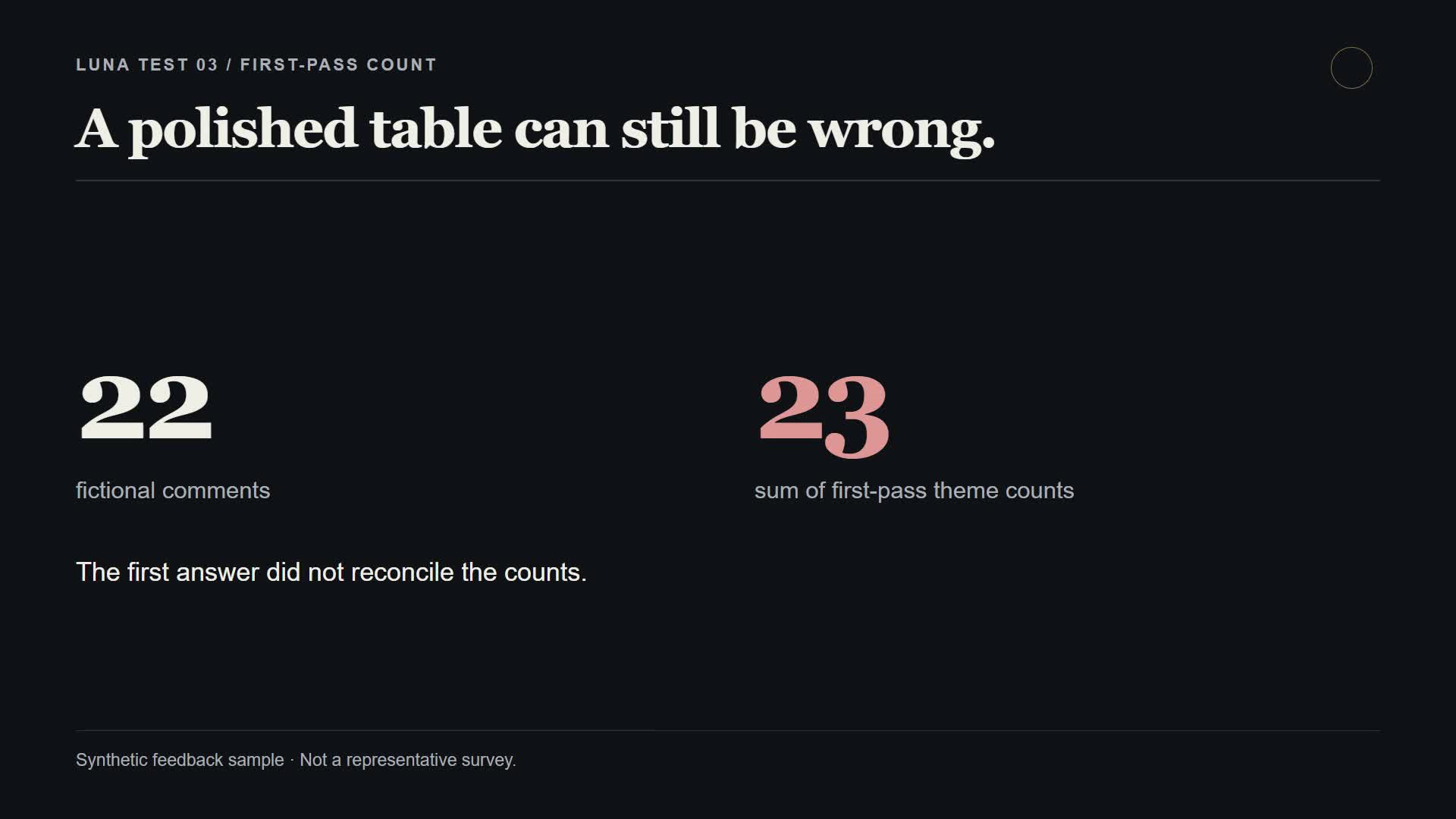
Luna turned 12 messy registrations into a usable CSV. It also turned 22 pieces of audience feedback into theme counts that added up to 23.
Both results belong in the walkthrough.
The useful question with GPT-6 Sol and Luna is whether either model can take a recurring job off your desk without creating more correction work. I tried five small Luna tasks, then added a separate Sol/Luna intake demonstration. Here's the setup, what came back, what needed fixing, and how to repeat the exercises.
Start here: Open the free practice resource guide for the exercise map and quick-start steps, or download the prompts and practice files. All businesses, inquiries, registrations and audience responses in the pack are fictional. You can follow along without uploading client information.
What was actually tested
The five original tasks used GPT-6 Luna Medium in ChatGPT Work. The later paired demo used GPT-6 Sol and GPT-6 Luna as separate Codex sub-agents, both requested at Medium effort. The follow-up footage was recorded after the main narration and is labeled that way in the video.
These were small demonstrations, not a controlled model benchmark. We did not measure generation time, token usage, API charges or correction time. The recorded demo interface displays saved model outputs; it is not running live inference during the screen recording.
The presenter in the video is my HeyGen AI digital avatar. The examples below come from the saved inputs, outputs and review notes for this project.
| Exercise | What it produced | What needed attention |
|---|---|---|
| Registration extraction | All 12 records in the requested CSV structure | Resolve three flagged records against the source |
| Client inquiry triage | Labels, evidence and reply drafts for 20 inquiries | One explanation asked about information already supplied; one borderline case exposed ambiguity in the rubric |
| Audience feedback | Themes, quotes and possible creator actions | First-pass counts totaled 23 for 22 responses |
| Transcript repurposing | Three Shorts drafts, a community post and a newsletter section | Duration labels needed a read-through and revision |
| Product catalog copy | Factual copy for four products | No image was provided, so this did not test vision or alt-text writing |
Sol or Luna: choose a job before a model
OpenAI positions Sol for complex coding and agentic workflows, and Luna for focused work at higher volume. That makes policy organization and multi-step planning reasonable Sol experiments, while extraction, classification and repeatable drafts are useful Luna starting points. The examples here are reasons to test those roles, not proof that one model always wins. Sol model documentation · Luna model documentation.
For this walkthrough, use the model and effort shown in your available picker and record them beside the output. Access can differ by account and surface; check the OpenAI rollout announcement rather than assuming the same selection appears everywhere.
Make a fresh conversation for each exercise. Keep the original answer before asking for a correction. Otherwise, you lose the part that tells you whether the workflow is dependable.
1. Turn messy registrations into a CSV
Video: 05:43 — registration extraction.
Open Luna/05-structured-extraction/SOURCE-RECORDS.md in the practice pack. It contains 12 fictional registrations, including blank fields and one conflicting description of a registrant's business.
Give Luna those records and the original prompt:
Extract the provided synthetic registrations into a CSV with exactly these
columns: record_id, event_date, business_type, main_question, needs_follow_up.
Use blank fields only when the source is blank; don't infer.
Set needs_follow_up to true only if a required detail is missing or two
supplied facts conflict. After the CSV, list the IDs that need follow-up
and the exact reason.
The saved result includes all 12 records and flags R-105, R-106 and R-108. R-105 has conflicting business types, R-106 has no main question, and R-108 has no event date. The model preserves the submitted business type in the CSV and calls out the conflict separately.
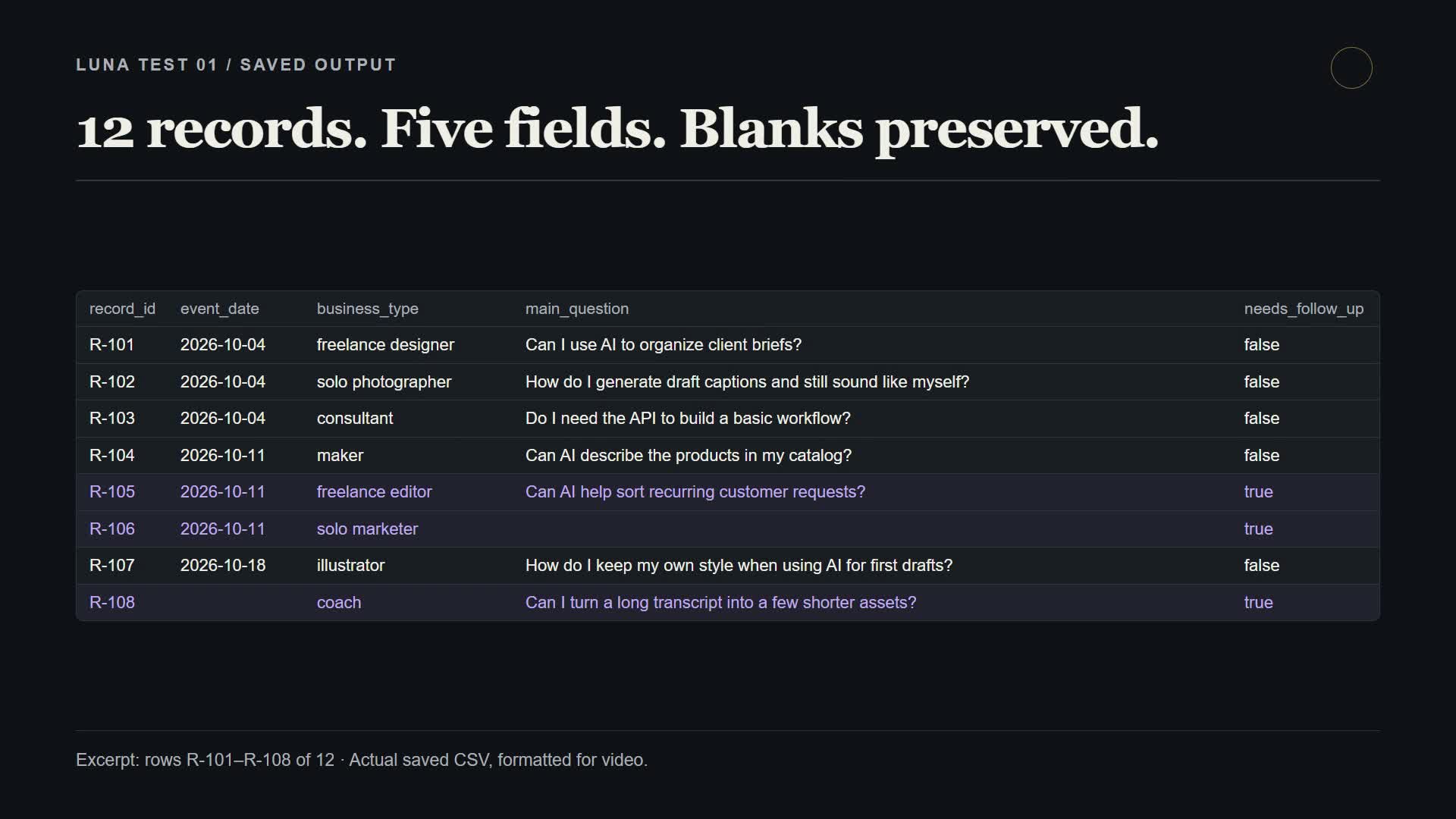
The video formats rows R-101–R-108 for readability. The complete exercise contains 12 records.
Check it yourself: count the rows, compare the column names, inspect every blank, and read each flagged record against the original. Missing contact details should not trigger follow-up here because contact details are not part of the requested schema.
This is a useful first exercise because the result has a clear pass condition. A polished table is easy to admire; a missing row is easy to overlook.
2. Sort client inquiries without making promises
Video: 06:52 — inquiry triage.
Open Luna/01-client-intake/INPUT-DATA.md. The fictional business sells one content package with a minimum price, a minimum turnaround and clear exclusions. The file also contains 20 inquiries.
Use its service rules and the original task prompt:
Apply the service rules exactly. Use only the provided inquiry text.
Do not infer facts that are missing.

For every inquiry, return a Markdown table with: ID, decision
(FIT / NEEDS_INFO / NOT_FIT), one short exact evidence quote,
missing information or out-of-scope reason, and a two-sentence reply draft.
Keep drafts respectful and don't promise a result or send anything.
After the table, list any uncertain classifications.
This block is an excerpt of the original prompt; the pack includes the complete version and category definitions.
The instructive error was L-016. Its inquiry already specified delivery in 15 business days. Luna's initial explanation treated timing as missing and asked about a timeline that was already covered. The missing detail was video length. A follow-up corrected the explanation and asked whether the video would be at most eight minutes.
There was a problem in the draft answer key, too: L-016 had originally been marked FIT even though its length was unstated. That key needed correcting. L-020 remained a borderline disagreement over whether to clarify an extra service request or reject it under the exclusions.
Review the explanation and draft separately from the label. A correct NEEDS_INFO label can still ask the wrong question. Before using this in a business, make the ambiguous policy explicit and check a small batch against that policy.
3. Summarize feedback, then make the counts reconcile
Video: 07:38 — the counting mistake.
Open Luna/03-feedback-analysis/SYNTHETIC-RESPONSES.md and ask for at most five themes, counts, exact response IDs, short supporting quotes and a possible action for each theme. The original prompt also asks the model to retain minority views and identify the sample as synthetic.
The first answer sounded useful. Its theme counts added up to 23, despite there being only 22 responses. It had not made a reproducible overlapping-count method clear.
Use this adapted follow-up prompt to make an exclusive count auditable:
Reconcile the analysis against the original response IDs.
Assign each response to exactly one primary theme.
List every member ID under its theme and report the count.
Check for missing IDs, duplicate assignments and unknown IDs.
The counts must sum to the number of unique input responses.
Keep dissent visible. Explain any changes from your first answer.
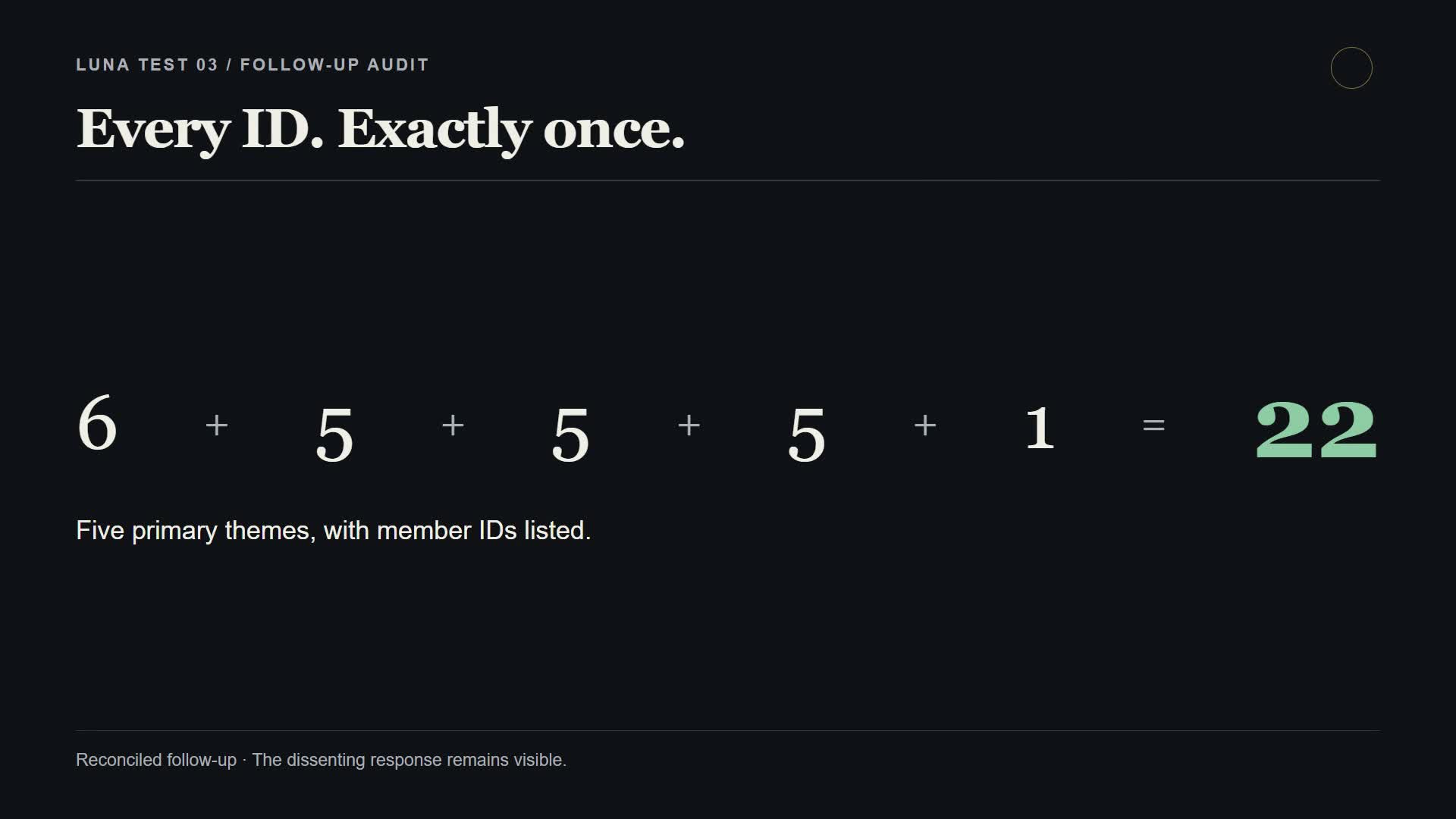
The saved follow-up returns 6 + 5 + 5 + 5 + 1 = 22. F-21 stays visible as the person who is not looking for more AI tools. The complete mapping is in RECONCILED-OUTPUT.md.
Overlapping themes can be valid. The requirement is to say whether a response can appear in more than one group. If you want percentages that add up to 100%, choose one primary assignment per response and inspect the membership lists.
4. Repurpose a transcript without adding a new opinion
Video: 08:01 — transcript repurposing.
Use Luna/04-transcript-repurpose/SOURCE-TRANSCRIPT.md with the original prompt:
Use only the source transcript. Create three distinct 35–50 second Shorts
scripts, one community post, and one short newsletter section.
Preserve the speaker's point and nuance; do not add facts, claims,
personal experiences, or a call to buy anything.
Avoid generic AI hype and repetitive hooks. For each short, include a
one-line source note naming the transcript passage it came from.
Clearly label this as a repurposing draft that needs human editing.
The requested formats were present and stayed close to the supplied point: choose one repeatable task, review the result and measure correction work.
The timing labels needed checking. Luna described the initial Shorts as approximately 40 seconds, but the scripts were short. A follow-up produced a 105-word replacement for Short 2—roughly 42–48 seconds at 130–150 words per minute, before allowing for pauses.
Read the script aloud or render a test voiceover. A duration label is an estimate. Also inspect each source note: if a Short joins two distant passages, make sure the resulting argument still belongs to the speaker.
5. Draft product copy from supplied facts
Video: 08:22 — text-only catalog copy.
Open Luna/02-product-image-catalog/PRODUCT-FACTS.md. This exercise uses four fictional products and seller-provided facts. Use TEXT-ONLY-PROMPT.md for the version that was actually run.
The key constraints are short factual titles, one-sentence descriptions, materials, provided size/wax details, and no inferred benefits or dimensions. Because no image is attached, every alt-text status must be Needs image.
The saved output represents all four products, keeps the titles within eight words and does not pretend to inspect a photo. That is the successful behavior for this input.
This was not a vision test. To test image recognition, supply the actual images, run a separate exercise and check that each observation belongs to the right product. Keep seller-provided facts distinct from what a photograph can establish.
The later Sol/Luna workflow: organize the rules, then process the batch
Video: 09:27 — the follow-up demo.
The follow-up makes a possible division of work easier to see. Sol documents a supplied service policy and its conflicts. Luna applies a fixed policy to a batch. Both also classify the same five challenge inquiries.
Open Demo/inputs/SERVICE-GUIDE.md, CLASSIFICATION-PROMPT.md and shared-challenge.json in the pack. The later policy is more explicit than the first intake exercise: it defines decision precedence, missing information, conflicting facts and optional extra deliverables.
To repeat the comparison:
- Freeze your inputs and expected answers. Keep the answer key out of both model conversations.
- Run the same five cases separately. Give Sol and Luna the same current policy and classification prompt. Record the model, effort and original answer.
- Ask Sol to document the workflow. Have it explain the current rules, where older notes conflict and which decisions need human review.
- Give Luna the routine batch. Use the same fixed policy with
routine-inquiries.json. - Inspect categories, evidence and wording. Keep editorial suggestions beside the untouched answers.
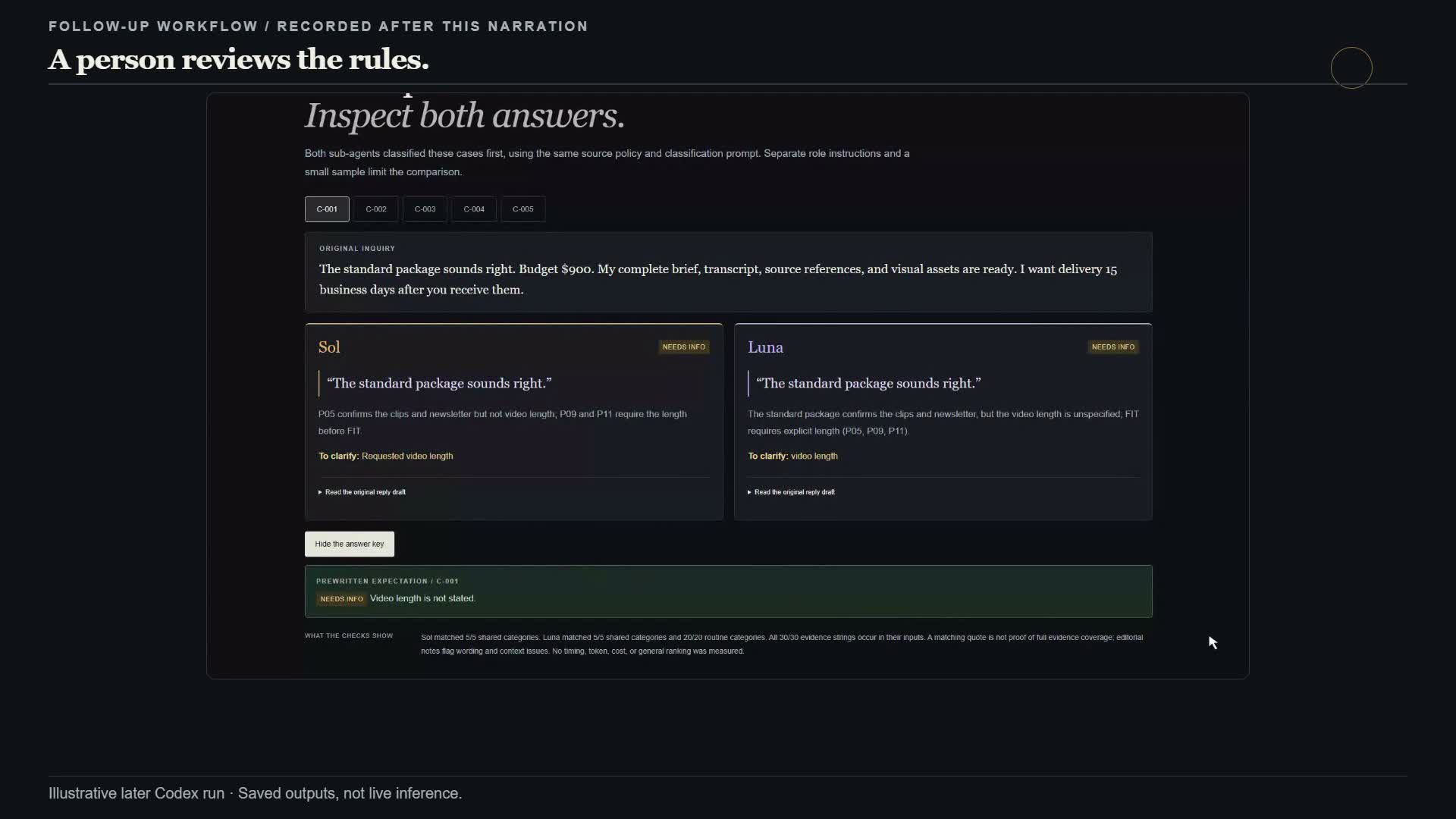
| Follow-up output | Categories matching the predefined key |
|---|---|
| Sol: five shared cases | 5/5 |
| Luna: five shared cases | 5/5 |
| Luna: 20 routine inquiries | 20/20 |
Those counts cover a small fictional sample. The review also found wording and evidence-selection problems. For example, one Luna reply confused the client's missing budget with the package's known minimum price. Another quoted only one of two conflicting deadlines.
Luna did not consume Sol's generated rubric in this recorded test. Both models used the predefined source policy. “Sol drafts the rules → a person approves them → Luna processes a batch” is a workflow you could build next, not an approval handoff demonstrated by these results. No customer replies were sent, and no real policy approval was recorded.
What the prices do—and do not—tell you
The following are the model pages' standard API text-token rates checked on September 23, 2026. They are not ChatGPT subscription prices or measured costs for these demos. Sol pricing · Luna pricing.
| Model | Input per 1M tokens | Output per 1M tokens |
|---|---|---|
| GPT-6 Sol | $2.00 | $10.00 |
| GPT-6 Luna | $0.10 | $0.50 |
For an illustrative standard request with 100,000 input tokens and 20,000 output tokens, the arithmetic is $0.40 for Sol and $0.02 for Luna, before other charges. Tool use, cache behavior, processing mode and long-input pricing can change the bill; consult the model pages for the applicable rates.
The unmeasured part in this walkthrough is the time spent reviewing and correcting. Record that in your own test before deciding which model costs less for a finished, usable result.
Your first repeatable workflow
Start with the registration exercise if you're new to this. It gives you 12 records, five columns and three known follow-up cases. You can inspect the whole result without building an automation.
Then choose one recurring task from your own work. Save an acceptable example, define the required fields and decide what should happen when information is missing. Run a small batch and record:
- Missing or invented facts.
- Incorrect counts or classifications.
- Edits needed before the output is usable.
- Time spent on those edits, alongside generation time and any billed usage.
Keep the workflow only if the completed result improves on your existing process. A cheaper model that needs constant cleanup may not be the cheaper way to finish the job.
Watch the full video · Open the practice resource guide · Download the practice pack.
If you try a task, bring the input, the output and the part you corrected to the Roundtable. That gives the next creator something useful to test.
Continue the walkthrough
- GPT-6 Astra on Plus: choosing where to spend your allowance.
- The HyperFrames walkthrough: how the video production workflow works.
- How I approach ethical AI use as a creator.
Sources and reproducibility
Product positioning and current pricing: OpenAI's Sol/Luna announcement, Sol model page and Luna model page.
The exercise results are from this project's saved runs dated September 22, 2026. The downloadable pack includes original prompts and inputs, saved outputs, corrections, and the later paired demo's run/review notes. Prompt blocks marked adapted are suggested follow-ups, not claims that those exact words produced the saved result. Published benchmark scores discussed in the video are separate from these exercises; see the OpenAI announcement and Zapier's AutomationBench methodology for that context.