ChatGPT dots for creators and solo businesses
You have a video idea, a transcript that could become three more pieces of content, and a client inquiry waiting for a reply. Each task is manageable. Keeping them all moving is the hard part.
Meet LEA, my dot. In the 4:45 video, ChatGPT Dots Are INSANE — Meet Your New AI Assistant, I walk through how a personal AI assistant could fit into that kind of creator day. The presenter is my digital avatar; LEA is the assistant working with me behind the scenes.
The examples are prepared and fictional. They show possible workflows, not real client outcomes or measured time savings. This companion gives you a way to try one yourself, with enough structure to judge the result.
Watch the walkthrough
What a dot actually does
OpenAI describes a dot as an always-on AI agent in ChatGPT. It can continue work between conversations, use connected apps, remember context, and bring results back for review. It has its own cloud computer; access to your computer is optional. You can also ask for reminders and recurring checks. See OpenAI’s getting-started guide for current access and setup details.
For a creator, the useful question is specific: which unfinished job could you hand over with a clear brief? A research note, a script draft, or questions for a prospective client gives you something concrete to inspect.
Start there. Expanding a workflow is easier once you know what a good result looks like.
Give it a job with a finish line
“Help with my content” leaves a lot to guess. A useful brief names the audience, source material, output, and boundaries.
For example, imagine a fictional solo creator preparing a video about repurposing long-form content. They need a sourced angle, a script, and supporting posts. They also sell editing services, so inquiries and delivery capacity matter.
The first request could be: research the question, propose two angles, and return a short brief with links. Stop there so the creator can choose. That decision becomes the starting point for the script.
This small pause prevents a weak assumption from spreading through every later asset. The assistant needs to know what you approved and what is still a possibility.
Follow one creator workflow through the handoffs
Begin with research. Ask for reliable sources, the date of any changing information, and unanswered questions. Open the links yourself. A confident summary is only useful if the cited page supports it.
Once you choose the angle, request a script for your audience and target length. Supply your examples and any claims you want excluded. Read the result aloud. Replace wording you would never say, check the factual claims, and decide what needs a demonstration on screen.
After recording, use the actual transcript for repurposing. The video shows the idea of producing three short-video scripts, a YouTube description, and a newsletter draft. Give each piece a different purpose while keeping the original meaning. A draft still needs editing and production before it becomes a published asset.
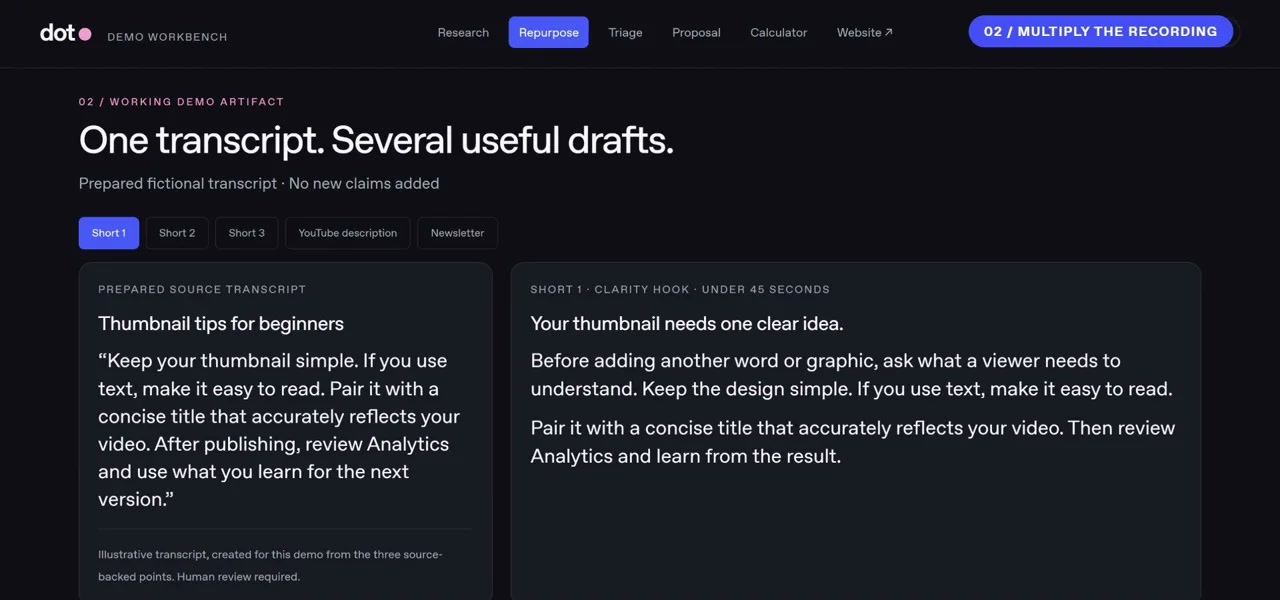
Prepared example: one transcript becomes several content drafts for review.
Now consider the business side. A fictional inquiry arrives asking for editing help. Give the assistant your written service rules and ask which details are missing. It can prepare questions and a proposal draft using the information available. You review the scope, timeline, revisions, and proposed terms before sharing anything with the client.
A pricing and capacity calculator can help you inspect the same offer. Specify the price, delivery hours, review hours, direct costs, and available time. Ask to see the formulas. Change an input and check that the result changes correctly. Include your own labor when evaluating whether the offer is worthwhile; a projected surplus is not proof that customers will buy.
Finally, ask for landing-page copy and a version you can inspect. The page should match the approved offer. Test it on a phone, try every button, and verify the contact flow before launch. Keep invented testimonials, customer logos, and unsupported results out of the brief.
The useful test across all of these steps is consistency. Did the same audience, offer, and boundaries survive each handoff?
Connect only what this task needs
OpenAI says connected apps can provide context for ongoing work, including proactive review. Check permissions before connecting an app. Its guide also notes that disconnecting an app does not erase information already obtained. Review the current controls before connecting confidential material. Read the connected-app and memory guidance.
For a first experiment, use a sample transcript and a fictional inquiry. Give a specific boundary such as “prepare a draft for me to review before anything is sent.” Decide separately whether a finished website should be published or kept for review.
Avoid a huge first assignment with several accounts and no checkpoints. You need to see where the assistant helps and where you still spend time correcting it.
Five starter prompts you can adapt
1 Research a useful angle
Research [topic] for [audience] using primary sources. Return two video angles, supporting links, and open questions. Date any changing information. Separate confirmed facts from assumptions. Wait for me to choose an angle before drafting.
2 Turn a brief into a script
Use this approved angle and source brief to draft a [length] video for [audience]. Keep my examples and qualifications. Flag claims needing verification or an on-screen demonstration. Don’t invent personal experience or results.
3 Repurpose a finished transcript
Using only this transcript, draft three short-video scripts with distinct angles, a YouTube description, and a newsletter. Show the source passage behind each main claim. Keep hypothetical examples labeled. Return drafts for review.
4 Prepare for a client reply
Compare this inquiry with my service rules. Identify missing details and scope conflicts. Draft questions and a proposal outline using only confirmed information. Mark proposed terms clearly. Don’t send anything or promise a delivery date.
5 Inspect an offer before launch
Using this offer and these cost and time assumptions, build a pricing and capacity calculator and draft landing-page copy. Show formulas and warnings when work exceeds capacity. Keep the website unpublished for review. Don’t invent testimonials or earnings claims.
Try one handoff this week
Choose a task you already repeat. Define the result, supply the source, and decide what you will check before using it. Count setup, review, and correction time when judging whether it helped.
Access, available tools, limits, and service costs can vary. OpenAI warns that a dot can make mistakes, including when following rules. Check important details and use its current guide for product specifics.
For a more detailed example, the earlier six-task LEA companion guide follows one fictional offer through research, content, client admin, a calculator, and a website.
What would you hand over first: research, repurposing, or client admin? Explore more practical workflows at AI Creators Roundtable, then choose one task and give it a clear finish line.